
26 KiB
KMind v2.13.5 Pro Trial & Multi-Root Frames
Notes: Starting from this version, you can start a one-click Pro trial (SiYuan account login required). Added multi-root frames and performance improvements.
New Features:
-
Added Pro trial: click a Pro feature to apply for a trial. To prevent abuse, you must be logged in to your SiYuan account
-

Added frame feature: adjust the frame flowing animation with one click to highlight key areas during presentations
-

Frames support multiple nodes: use frames to manage multiple root nodes or SiYuan block nodes
-
Added a shortcut to toggle read-only mode
Fixes & Optimizations:
- Improved mirror block performance with incremental updates by default
- Fixed an issue where resizing the canvas in multi-root mode could shift root node positions
- Fixed occasional node content misalignment when the canvas changes
- Improved node drag interaction (no flashing/teleporting when dragging)
- Fixed an issue where the plugin could affect PDF jumps
- Improved dragging of SiYuan block nodes: added a drag handle for smoother dragging
KMind v2.13.4 Bugfix Release
Optimization:
- Optimized the save failure prompt when opening the same mind map
KMind v2.13.3 Epic Update: Support Dragging SiYuan Blocks Directly into the Map & Global Shortcuts
Description: This version supports dragging SiYuan documents and blocks directly into the map, and allows configuring global shortcuts that apply to all KMind assets.
New Features:
-

Support dragging SiYuan documents directly into the map. If dropped on a blank area, a new root node is created with the document name. If dropped on a node, the node's SiYuan hyperlink is updated.
-

Support dragging SiYuan blocks directly into the map. Hold Shift to create a child node and render it as a SiYuan block, otherwise a SiYuan block area is created directly in the map.
-
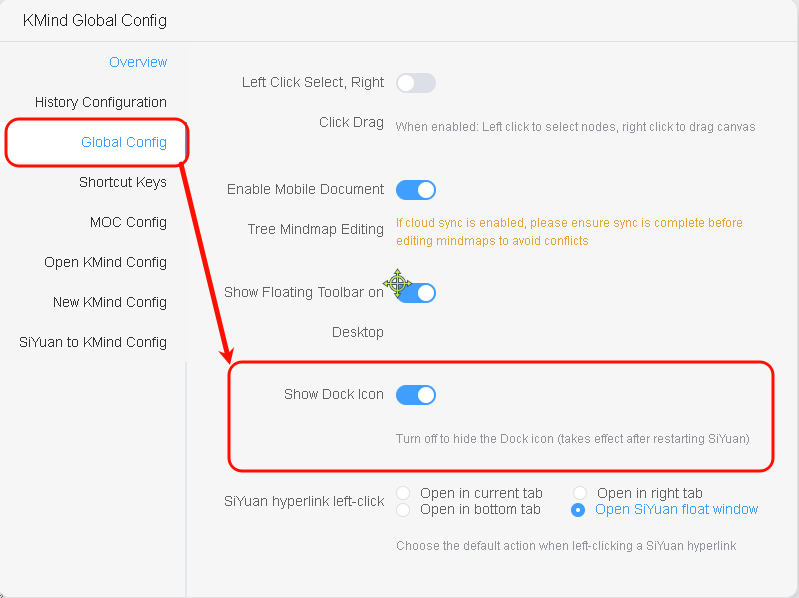
Added KMind Dock icon visibility configuration. Quick start: Top-right KMind Global Config -> Global Config -> Show Dock Icon
-
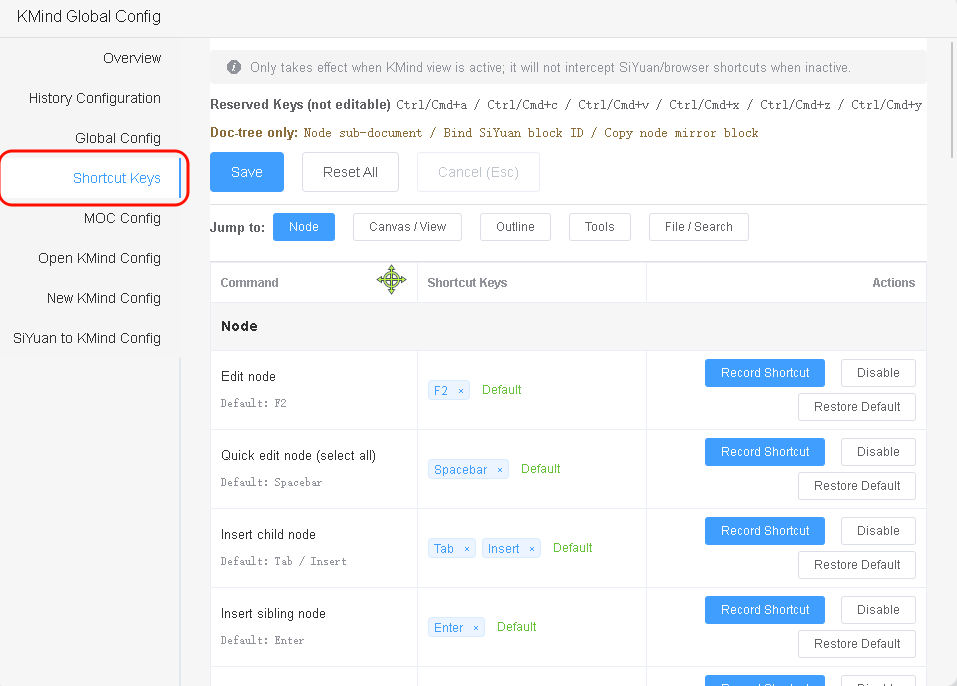
Added built-in shortcuts, ready to use out of the box, including Zen mode, hyperlinks, etc. Shortcuts can be freely configured and take effect immediately after saving. Quick start: Top-right KMind Global Config -> Shortcut Keys
Fixes & Optimizations:
- Fixed blank outline expansion in multi-root mode
- Fixed import/export issues with some files in multi-root mode
- Optimized console debugger output when switching tabs & opening maps without history versions
- Shortcut hints in the map now sync when global shortcuts are modified
KMind v2.13.1 Multiple Roots Support Different Layouts & Themes
Update Summary
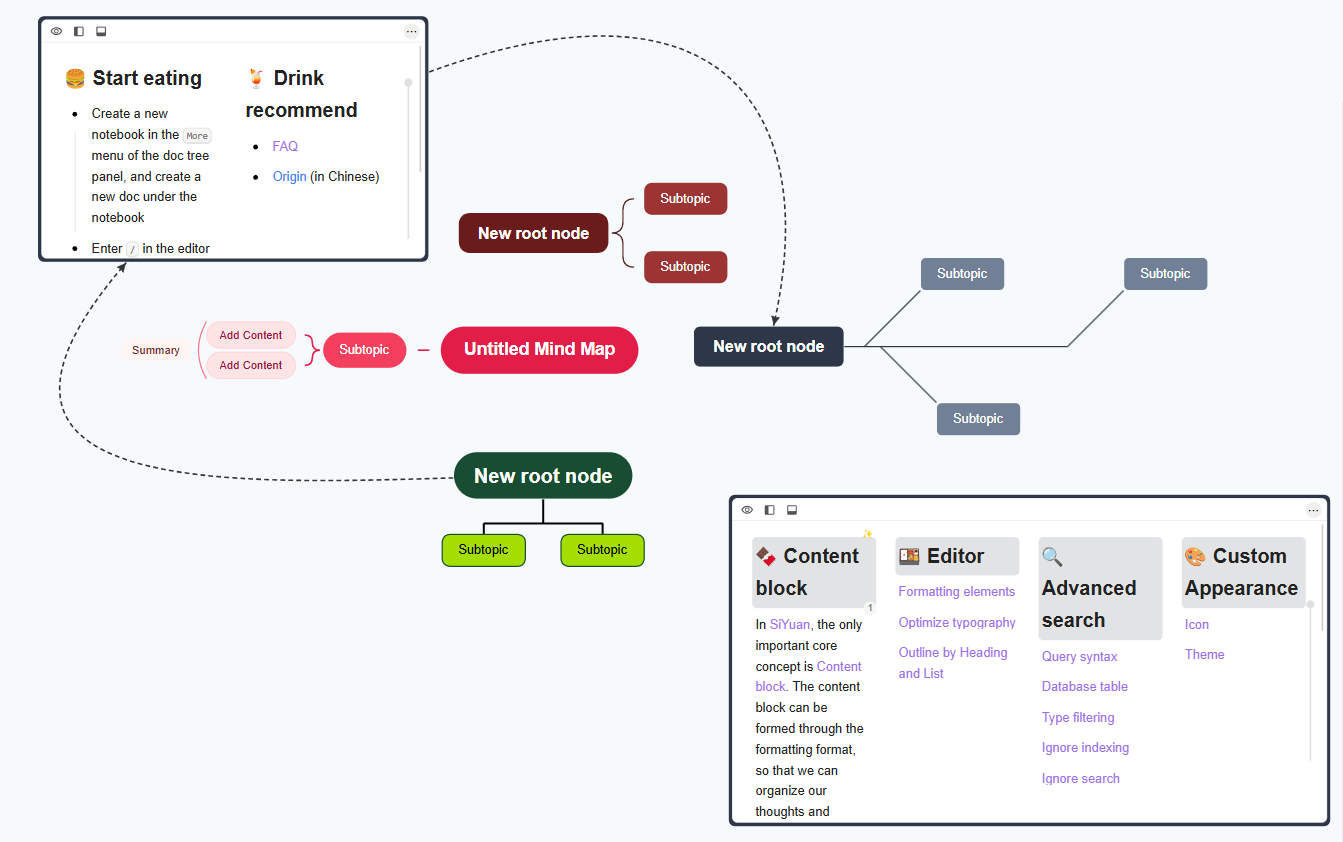
This version further optimizes the multi-root experience, supporting different themes and layouts for each root, and adds a series of interaction improvements.
New Features
-


Support setting different theme & layout for each root individually
-
Optimized the interaction for dragging child nodes to become new root nodes
-
Added root node collapse functionality
-
Added new delete logic for root nodes: first Del key deletes child nodes, second Del deletes the root node
-
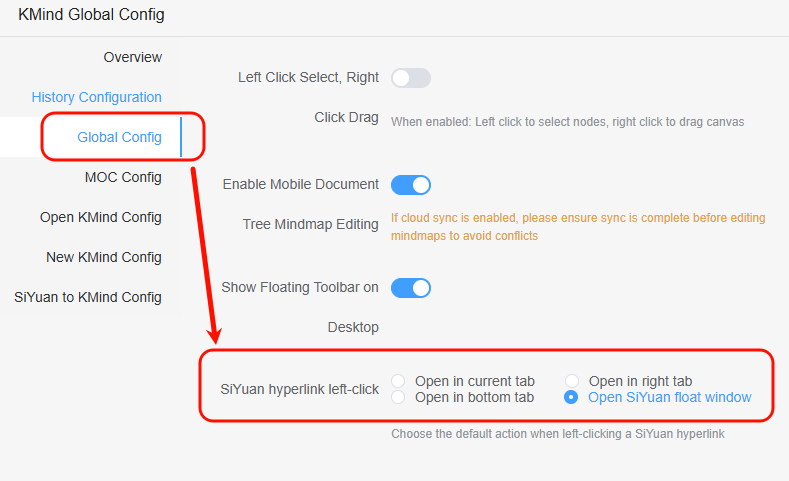
Added global configuration for SiYuan hyperlink icon click behavior
Fixes & Optimizations
- Fixed rainbow lines error in multi-root mode
- Optimized add root node logic to avoid double refresh, improving performance
- Optimized search box style to avoid unexpected shadows
- Fixed search box close button being truncated
KMind v2.13.0 Supports Multi-Root Mode
Description: From the first line of multi-root code written on June 15th this year until now, half a year has passed, experiencing the transition from traditional programming to AI Coding. Now I'm happy to announce that KMind officially supports multi-root nodes! Whether it's widget maps, Dock bar maps, or document tree maps, all support multi-root node functionality! Moreover, existing data will automatically migrate to the latest data structure when you actively create a second root node, without any manual operation! You can double-click on the blank canvas in existing maps to create additional root nodes!
Next, we will demonstrate the multi-root node features using the Document Tree Map, which has the most complete feature support:
-

Create a KMind map in SiYuan document tree and set your preferred theme and style
-

Double-click to create additional root nodes

-
Copy the SiYuan block ID you want to embed, right-click the node to bind and render that SiYuan block (Dock maps don't support this feature yet)

-
Rendered SiYuan blocks can be resized by dragging, and you can choose where to open the block via the quick action bar

-
Rendered SiYuan blocks can essentially be treated as mind map nodes, so you can create child nodes, relationship lines, and drag them to any position

-
After creating multi-root nodes by double-clicking, drag any child node to blank canvas for more than 2 seconds to make it a new root node
-

Use the node TODO feature to create lightweight TODO root nodes, delete when done
-

Use the node sub-document feature to quickly create SiYuan sub-documents, practicing lightweight, self-controlled MOC (Dock maps don't support this feature yet)
-

Use node hyperlink feature to navigate directly to any node in the map from anywhere
Note:
This version is the initial release of multi-root mode. Many interactions are still being improved and will be gradually enhanced based on user feedback. The number of embedded SiYuan blocks depends on device performance - it's not recommended to maintain a large number of SiYuan blocks in the same map.
KMind v2.12.0 Nodes Support Direct Rendering of SiYuan Blocks and (( Quick Reference
Description: In this version, document tree map nodes can directly render SiYuan blocks, and you can use SiYuan's (( shortcut to quickly reference SiYuan documents while editing
New Features:
-

Document tree map nodes can now directly render SiYuan blocks! The number of blocks that can be rendered depends on your machine's configuration
-
When editing a node directly, you can type
((or{{to reference SiYuan documents with an interaction similar to SiYuan's native behavior; Note: popup editing does not support this shortcut yet
-

SiYuan document tree right-click menu now supports inserting sibling KMind document tree maps
-

Added chemical equation support for nodes; popup editing does not support this yet
-

One-click SiYuan document to KMind map conversion improvements: filter empty blocks, display SQL for embed blocks, map tags, add code block display support, optimize icon adaptation, adapt to SiYuan native references, support formulas
Bug Fixes:
- Fixed an issue where images couldn't be loaded when converting SiYuan documents to KMind maps
- Fixed an issue where the map wasn't properly destroyed when switching documents in MOC mode on mobile
Other:
KMind's theme sharing website now has 8 new bracket line style themes, go check them out!
KMind v2.11.0, New Bracket Connection Style and Markdown Import
New
- Added a new bracket connection line style (available for specific layouts, works best with rainbow lines)


- Theme Designer now supports bracket line style and node margin configuration

- The import dialog now supports pasting Markdown text directly and improves Markdown import behavior
KMind v2.10.2
Fixes
- Fixed an issue where typing
/in inline node editing would trigger the expand/collapse shortcut instead of being entered as text - Fixed an issue where
Ctrl+Aand other editing shortcuts did not work in the DOM-mode popup editor
KMind v2.10.1
Fixes
- Fixed occasional shortcut key failures caused by MOC mode
- Fixed i18n warnings and improved performance
KMind v2.10.0, New MOC Mode
Hi~ After a period of design work and incorporating interaction suggestions from enthusiastic community members, another major feature is here: KMind MOC Mode!!
New Features:
-

KMind MOC Mode: Display the document tree as a mind map with a one-to-one correspondence between nodes and Siyuan documents. Access: Right-click any Siyuan document -> Plugin -> KMind -> Switch to MOC Mode
-
How is this different from the previous node-associated Siyuan sub-document feature? In previous non-MOC maps, you could add nodes freely and control whether nodes were associated with Siyuan documents; MOC maps render in real-time with a strong correspondence to the Siyuan document tree, and the map's functionality is more restricted.
-
Important notes: Since creating nodes requires synchronous creation of Siyuan documents, please avoid creating a large number of nodes in a very short time. Some bulk node creation features will be disabled in MOC mode and may be optimized and enabled later.
-
Most edge cases have been handled. If issues occur, you can right-click the MOC map to refresh.
-
By default, there are two ways to open the document corresponding to a node: through the hyperlink icon or through the floating toolbar.
-
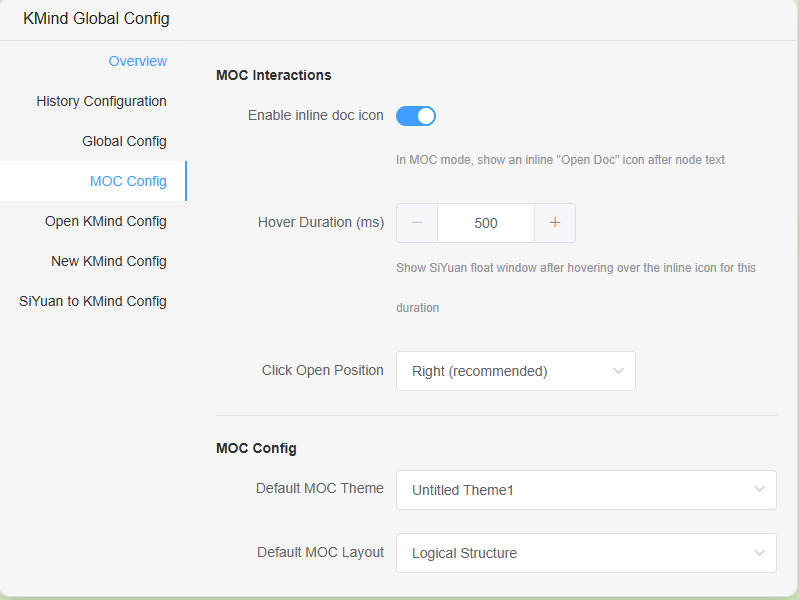
Global configuration allows you to change MOC map settings, such as whether to display hyperlinks, set default theme and layout for MOC maps, set the waiting time for displaying floating windows, etc.
-
-

Node image direct copy functionality
-
Global read-only functionality: Set global read-only status in the global configuration to prevent accidental operations
Bug Fixes:
- Fixed a bug where deleting nodes before a summary could cause the summary itself to be deleted due to summary indexing issues
- Fixed a bug where relationship lines could still be modified in read-only mode
- Fixed a bug where bottom bar avoidance would not restore to its original position in read-only mode
Notes:
Everyone, please go to the KMind theme sharing website (https://share.kmind.app) to share your themes! The example images in this update use the Matcha Green theme from the theme sharing website~
Theme Designer location: KMind menu in the top-right corner of Siyuan -> Theme Designer. After designing, click Share!
KMind v2.9.2 Fixes Document Tree Map Search Bug and Adds Auto-Focus to Search Box
KMind v2.9.1 Fixes Spacebar Shortcut Bug
KMind v2.9.0 Reconstructs the Bottom Layer, Adds Node Hyperlinks and Theme Designer
Description: Hello everyone, after several months of refactoring, KMind 2.9.0 is ready to launch~~ We sincerely thank more than a dozen enthusiastic community members for their testing. The purpose of this refactoring is to better integrate with Siyuan, laying the foundation for future advanced features such as direct interaction between Siyuan blocks and mind maps, and MOC functionality.
New Features:

1. Added global node hyperlinks, which can be placed in any external software, such as Anki or any other external software. Clicking the hyperlink will open Siyuan and jump to the specified node in the specified mind map

2. Added theme designer & sharing functionality. After designing and saving a theme, you can use it in any KMind mind map and global configuration, and quickly share it with others or import themes shared by others~
Note: After designing and saving a theme, you need to reopen the mind map to select the newly designed theme
3. Launched a new theme sharing website
Feel free to visit: https://share.kmind.app
4. Refactored global configuration, added preview images for theme & structure dropdowns
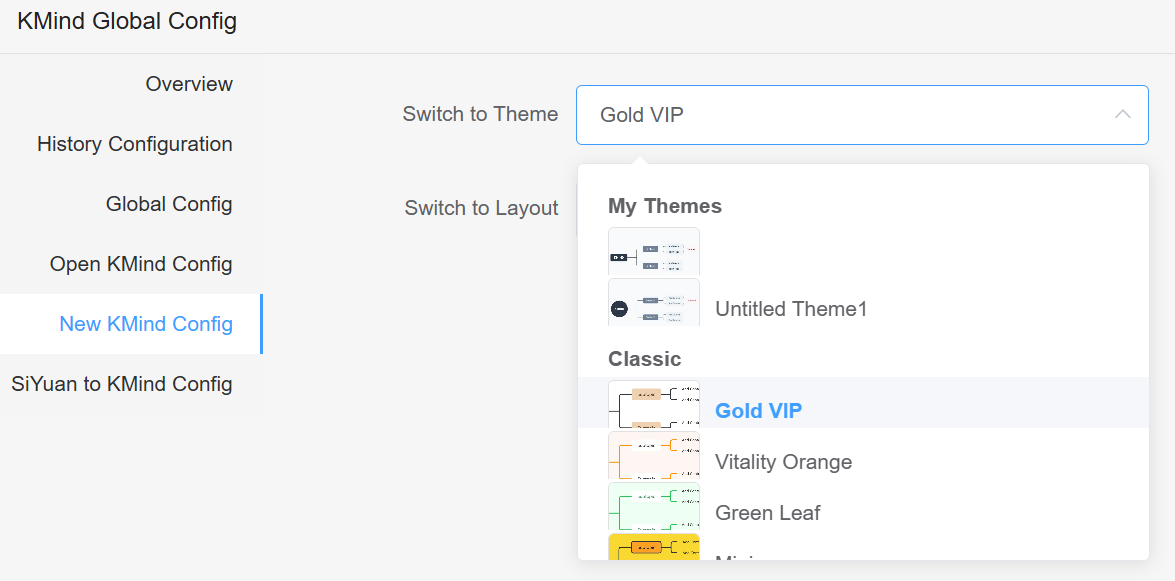
Optimizations & Fixes:
1. Optimized mind map theme preview images & structure preview images, adapted to custom themes
2. Fixed bug where node jump to Siyuan block could not accurately locate in certain situations
3. Fixed bug where KMind icon would not display in non-official Siyuan themes in the new version of Siyuan
KMind v2.8.1 Optimizes the Floating Toolbar Experience and Adds Global Configuration
Description: This version optimizes the floating toolbar experience, adds global configuration, and adds a feature to remove SiYuan PDF links
New Features:
1. Added global configuration, allowing users to configure whether to display the floating toolbar on desktop, displayed by default
2. Added the feature to remove SiYuan PDF hyperlinks, accessible via: right-click -> select "Remove SiYuan PDF association"
Optimizations:
1. Optimized floating toolbar experience, will automatically hide in certain situations and dynamically update position following node editing
2. Restructured the global configuration settings page
KMind v2.8.0 adds intuitive buttons, direct PDF annotation jumping, and document tree map editing on mobile
Note: This version optimizes the underlying data structure, reducing KMind's storage space by about 30%. We've enabled document tree map editing on mobile devices and added intuitive buttons for mobile users, as well as a new feature to jump directly to PDF annotations.
New Features:

1. After several internal iterations, KMind's original "Intuitive Button" is now available! We recommend using it with Zen mode - hide other toolbars, hold and drag the intuitive button to easily create nodes centered around your current node.

2. When creating document tree maps, the document title is automatically applied as the root node text
3. New global configuration allowing document tree map editing on mobile devices
Note: Although KMind has made many synchronization optimizations, to avoid conflicts between devices, please ensure synchronization is complete before editing maps!

4. New direct PDF annotation jump feature
After highlighting text in SiYuan's PDF viewer, simply click "Copy annotation" and paste it directly onto a node. KMind will automatically parse the annotation data, and clicking it will take you directly to that specific location in the PDF.
Optimizations & Fixes:
1. Removed unocss library in favor of native CSS, fixing a strange bug where SiYuan article styles would be lost when copied to WeChat Official Accounts
2. Added "unavailable" tooltips for the mobile dock bar - if you want to use KMind on mobile, try the widget version or document tree maps
3. Fixed unexpected scrollbars when displaying KMind in SiYuan tab pages
4. Fixed FreeMind export bug
5. Child documents in document tree maps now open on the right side by default
6. Optimized mirror blocks and child node mirror blocks logic, with automatic centering
7. Improved initial loading indicators
8. Updated KMind hyperlink parsing to support the latest SiYuan version (v3.1.26+)
Important Note:
This KMind update includes breaking changes to the underlying data structure from upstream libraries. However, we've made every effort to ensure compatibility - simply opening your maps will update them to the new data structure without any noticeable changes. The benefits are clear: smaller data size (typically reducing storage usage by about 30%) and fewer style bugs when copying nodes.
The downside: when switching themes in older KMind maps, you may notice some styles aren't properly overridden by the new theme. A less-than-perfect solution is to right-click on the map and select "Remove all custom node styles" (this will also remove any manually defined styles), allowing the new styles to be applied smoothly.
KMind v2.7.0 Adds Node Mirror Blocks and Global Search Integration for Document Tree Maps (Initial Release) (February 12, 2025)
Overview: Added mirror block functionality for document tree maps and node mirror blocks; integrated SiYuan's global search feature (initial version with some limitations); added direct node-to-image copying; updated hover preview to support the latest SiYuan API (v3.1.20+) while maintaining backward compatibility.
New Features:

1. Document Tree Maps Now Support Mirror Blocks! Quick Start: Right-click on a document tree map -> Plugin -> KMind -> Copy Mirror Block, then simply paste (Ctrl+V) anywhere in SiYuan!


2. Individual Nodes in Document Tree Maps Can Now Have Mirror Blocks! Quick Start: Right-click any node -> Select Copy Node Mirror Block, then paste (Ctrl+V) anywhere in SiYuan!
Note: Node mirror blocks may not display optimally with certain themes. This isn't a bug - it occurs when the theme's background color matches the node text color, making nodes appear blank. Please explore different themes to find one that works best for you.

3. Document Tree Map Node Content is Now Searchable via SiYuan's Global Search!
There are some current limitations: only newly created document tree maps will be searchable. To make existing document tree maps searchable, you'll need to manually update them (e.g., by adding and then deleting a node). Once this feature is stable, we'll release a "one-click update" function to make all existing document tree maps searchable without manual intervention.
4. New Feature: Copy Node as Image! Quick Start: Right-click any node -> Copy Node as Image. You can even right-click the root node to copy the entire mind map as an image for easy sharing (processing time may vary based on your computer's specifications when dealing with many nodes).
Due to browser security policies, this feature is guaranteed to work only in the desktop client. Support for other platforms will be considered based on user feedback.
Optimizations and Bug Fixes:
1. Updated to support SiYuan's new API (v3.1.20+). Both old and new versions now support Alt+Left-click on node hyperlinks for hover preview.
2. Fixed an issue where rainbow line configurations weren't being saved during imports.
3. Fixed a bug where exported data was empty when exporting immediately after opening a mind map.
4. Fixed various i18n text errors.
5. When using arrow keys to navigate between child nodes, nodes are now only activated without being centered.
6. Improved mirror block and node mirror block performance - updating the main mind map no longer causes flickering.
7. Adapted to SiYuan v3.1.21's document tree behavior changes, resolving an issue where creating document tree maps would show an error message despite successful creation.
Other Notes:
1. Known Issue: If you open a KMind map and immediately switch to another tab, the mind map app may fail to find the tab page DOM node to mount to, resulting in an endless loading spinner. No data is damaged - simply reopening the mind map will resolve the issue. We're actively working on a solution.
2. Some users reported that copying SiYuan text to WeChat Official Accounts loses styling. After investigation, this is caused by the unocss library used by this plugin (though we believe it's more of a WeChat limitation). We're migrating to tailwindcss, expected to complete within two versions. As a temporary workaround, you can disable the plugin when copying text. Note that my KNote plugin also uses unocss framework.
KMind v2.6.2 Added One-button Mind Map Insertion into Document Tree, Node Checkbox, and FreeMind Import/Export
Description: One-click KMind conversion now supports direct insertion into the document tree, added FreeMind import/export, node checkbox functionality, naming feature when creating mind maps, and various experience improvements
New Features:

1. When converting to mind map, you can now right-click to export as a sub-diagram in SiYuan documents, quickly inserting the converted mind map into the SiYuan document tree. Quick start: Right-click -> Export -> Select Document Sub-diagram -> Confirm
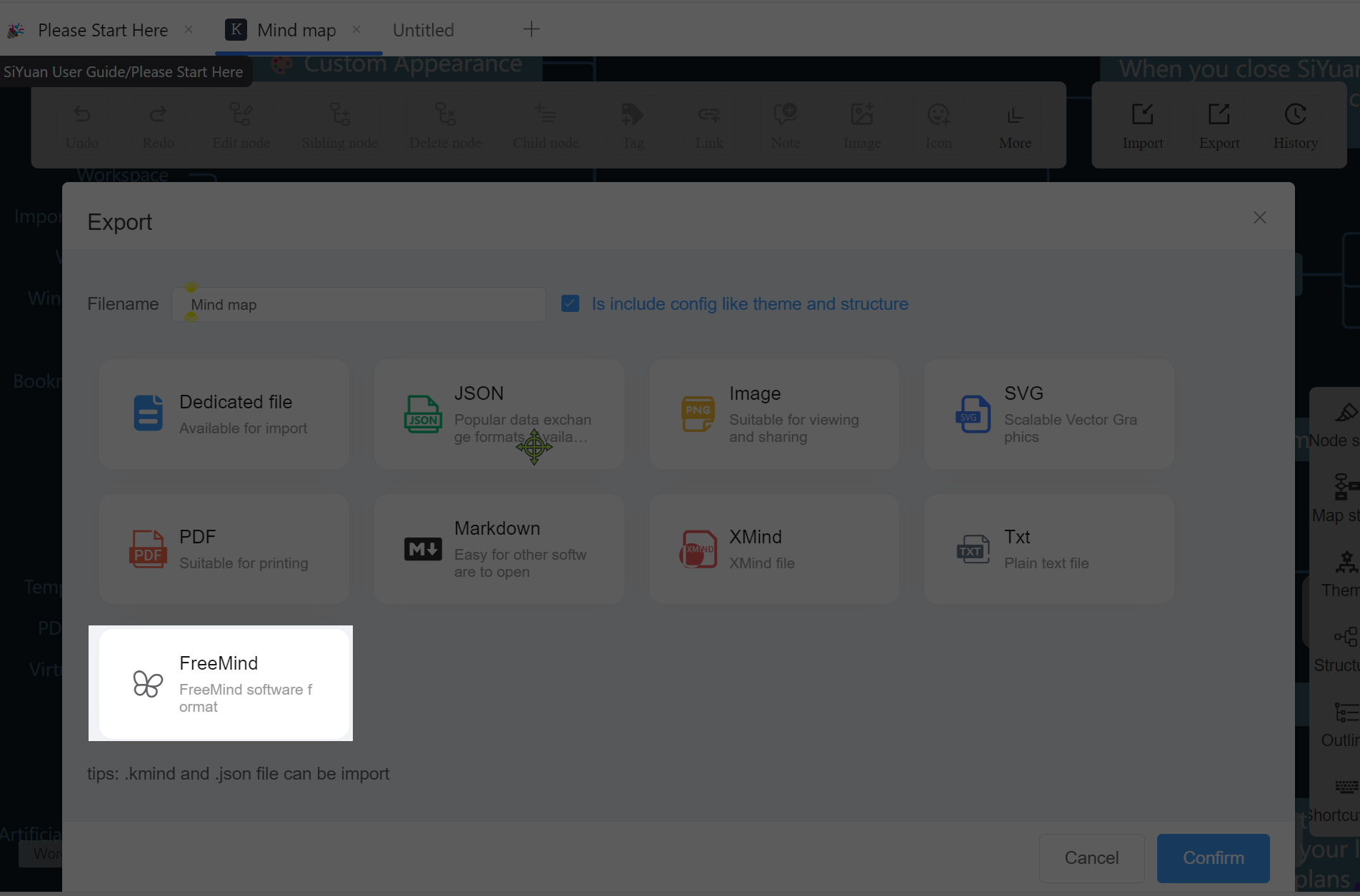
2. Added FreeMind import and export functionality

3. Added node checkbox functionality

4. When creating a mind map in the document tree, you can now customize the name (of course, you can also just click confirm)
Optimizations:
1. When left-click select and right-click drag are set in desktop global configuration, mobile devices will ignore this configuration by default to ensure mind map dragging functionality
2. When there are no actual changes to the mind map data (note that node folding counts as an actual change), view data saving is not triggered by default. This ensures that when you open a mind map and drag to view it, the source file won't be updated, minimizing synchronization conflicts
3. Optimized relationship line editing, custom colors, etc.
4. Various other minor experience improvements
Other Updates:
1. Updated i18n and upgraded underlying libraries
2. Collecting SVG format link icons - we need an icon that distinguishes SiYuan block links from other links in nodes. The icon should be clearly distinguishable from existing icons. A one-year KMind subscription will be offered as a thank you for accepted submissions ;p
KMind v2.6.1 Adds Global Configuration for One-Click Mind Map Conversion
Description: Added global configuration for one-click conversion from SiYuan documents to KMind, allowing customization of themes and structures after conversion. Removed some logs, optimized performance, and fixed several bugs.
New Features:
1. Global configuration for one-click conversion from SiYuan documents to KMind, now supporting customization of themes and structures after conversion
Bug Fixes:
1. Fixed incorrect text in global configuration for "Left-click drag, right-click select"
2. Fixed the bug where export dialog appears twice during one-click KMind conversion
3. Fixed the bug where rainbow line configuration fails to save on second attempt
Other Updates:
1. Updated mind map saving logic, intercepting first automatic save operation when rendering old mind maps
2. Removed unnecessary log entries, optimized performance
KMind v2.6.0 Update - New Global Configuration, Quick Paste for SiYuan Hyperlinks
Description: Added global configuration functionality, allowing you to set global mind map behavior through the KMind plugin, including document tree maps, dock bar maps, and widget maps. Added smart pasting of SiYuan hyperlinks as node hyperlinks.
New Features:
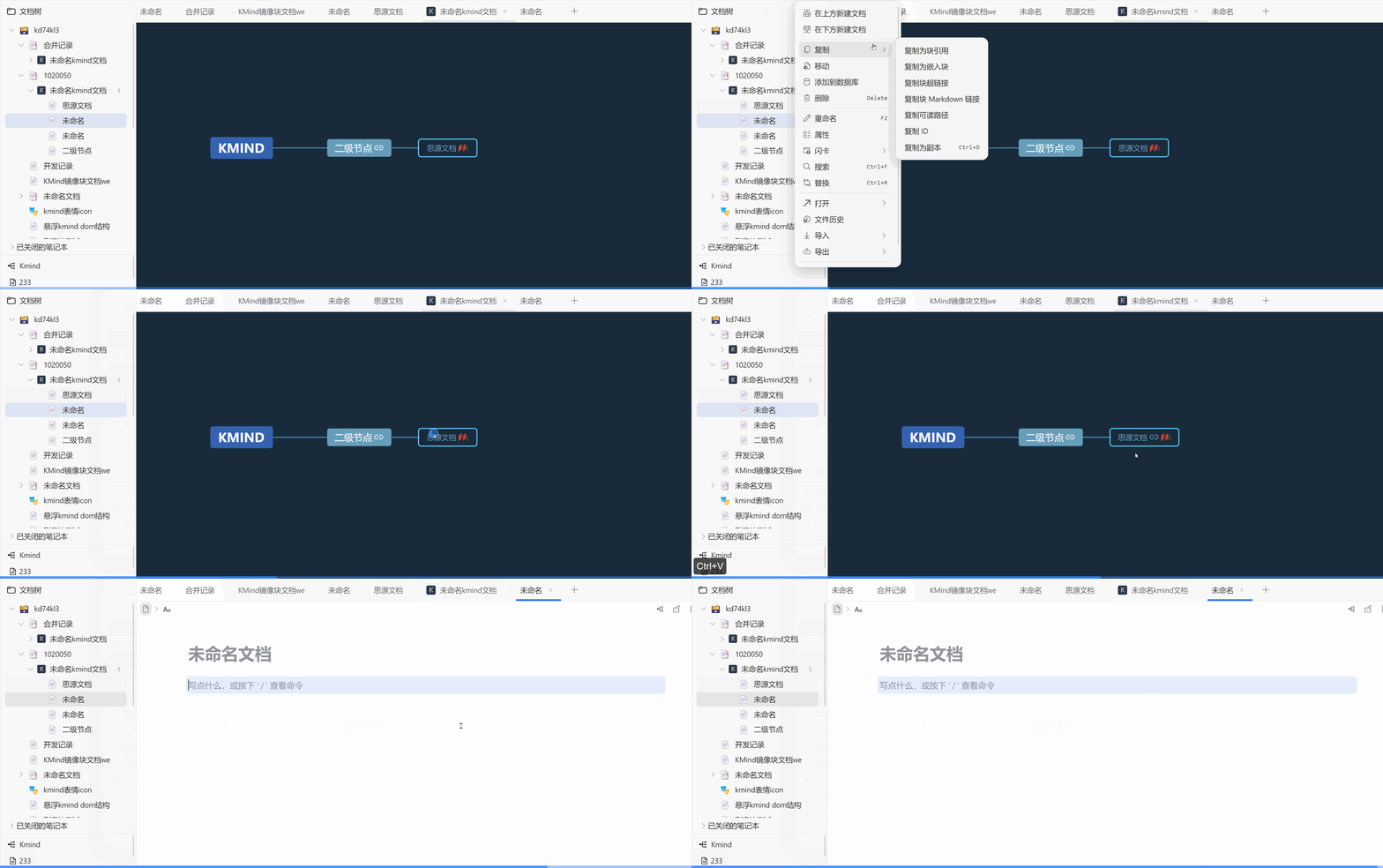
1. Quick paste SiYuan hyperlinks as node hyperlinks:
Previously, you needed to copy the SiYuan hyperlink (starting with siyuan://), click the node, click the hyperlink button, and then confirm;
Now it's much simpler! Just copy the SiYuan hyperlink, select the node, and press ctrl+v to paste.
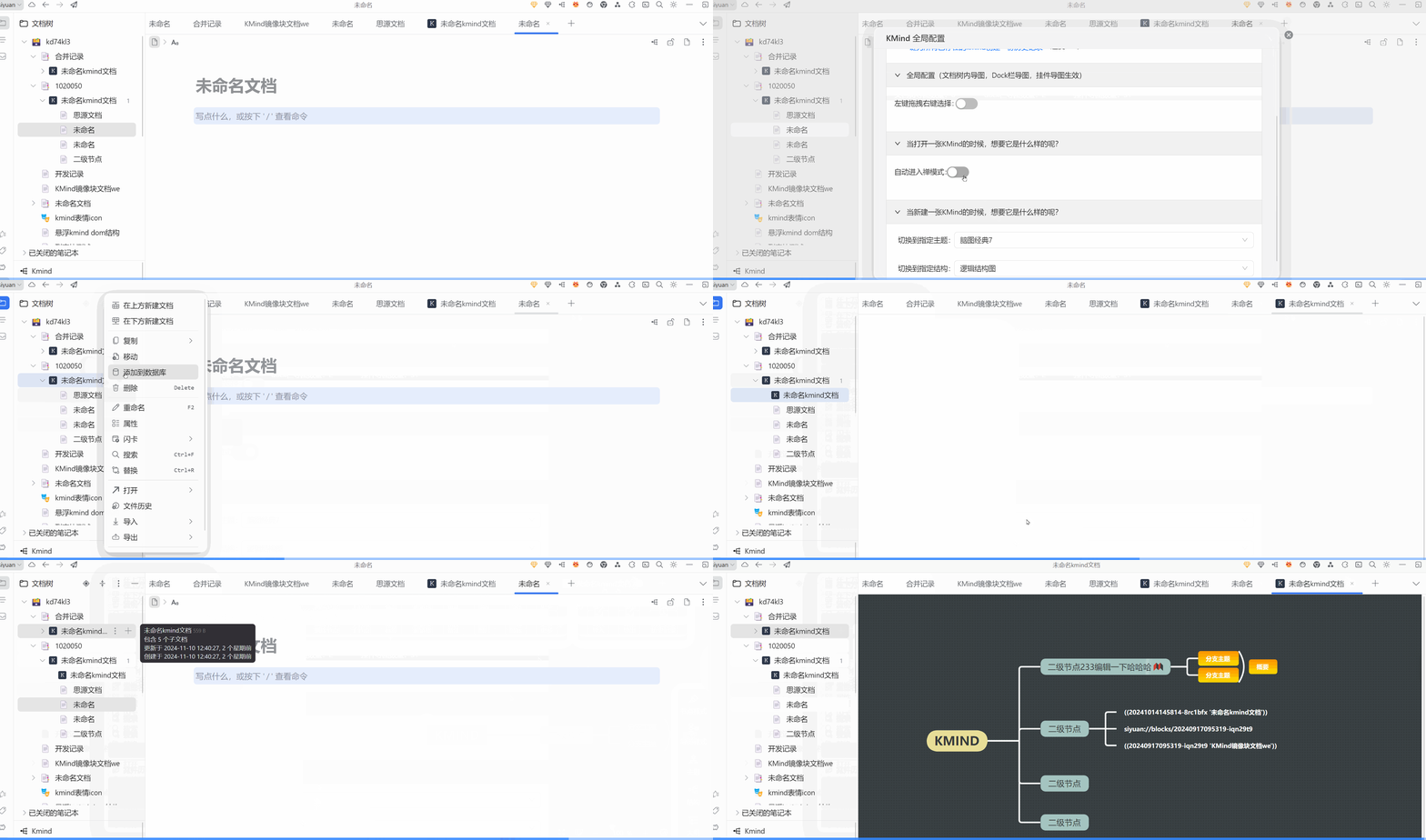
2. KMind global configuration allows you to configure default behavior for all mind maps with one click. Currently available settings include: 1. Mouse left-click select and right-click drag configuration; 2. Auto-enter zen mode when opening mind maps; 3. Default theme selection when creating mind maps (including document tree maps, dock bar maps, and widget maps), and default structure selection (pro)
Optimizations:
1. Removed the language switch dropdown from the bottom toolbar, automatically adapting to SiYuan i18n
2. Optimized some performance issues, fixed some non-functional error logs, improved batch format brush performance
Other:
Features marked as pro in this version are free for a limited time, no payment required :P